1.0
-
1.5
Studios
Role: Lead Designer
Studios revolutionizes network management by providing a user-friendly interface that eliminates the need for complex terminal-based configurations.
Success Metrics

48.6% Revenue increase

Since Studio’s release, we have seen a 48.6% revenue increase.

16 More Major customers since release

With the release of Studios we started to get a lot of attention from a wide variety of companies.

Helped network bandwidth during Covid

“The focus on application performance and network congestion will help companies manage networks serving remote workers.” -Antone Gonsalves

Sped up set up time by 20%

Testing the old workflow compared to the new workflow showed a significant amount of time reduction.
Context

Studios was my two and a half year long main project. In the beginning, Studios was just a terminal created by a developer wasn’t very user friendly for the broader user demographics.


The structure and foundation of this process for a user to configure a device was beyond a fair amount of complexity for average users so my aim was to dumb down the steps by organizing each part into digestible bites.


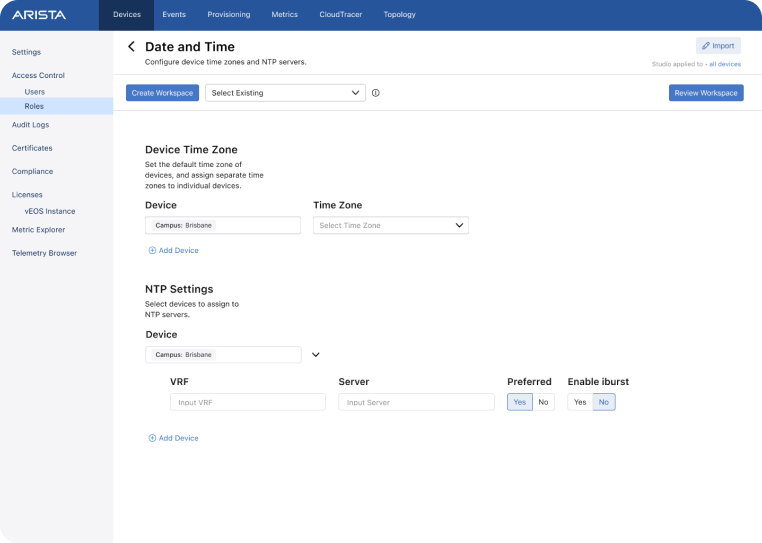
What you see here on the right was a V1 created by studio’s complex logic. (Early 2020)

1.1
Overview

Process

• User Personas /
Customer Needs
• Mind Mapping
• Wireframes
• High Fidelity
SE-Testing

Design Timeline

• V1 12 Weeks
• Overall V1 Feature: 3 Months

Team Collaboration

• Product Director
• Engineer Team
• Sales Engineers

Deliverables

• Customer Persona Flows
• Feature Mind Mapping
• Wireframe Concepts
• Hi-Fi Mocs
Background and Problem
Studios was designed to solve the problem of complex network configuration management.

Before Studios, users had to rely on terminal-based configurations, which were cumbersome and time-consuming. Studios aimed to simplify and streamline network management processes, making it easier for users to implement changes and manage setups efficiently.

1.2
User Persona/ Customer Needs

Average User before Studios

Before the introduction of Studios, network engineers typically engaged in manual and time-consuming processes. They would design network configurations using basic tools, manually configure devices through command-line interfaces (CLIs), and deploy changes individually to each device. Monitoring and troubleshooting involved  accessing  multiple devices to gather data, often leading to complex  and lengthy procedures.

Automation was limited, and engineers relied heavily on manual processes for configuration management and network operations. Overall, their work was fragmented, requiring them to manage multiple tasks across various devices and configurations.

Sarah Chang
Age: 35
Years in Network: 12
Background
Sarah is a network engineer with over a decade of experience in managing and optimizing large-scale networks for a multinational corporation. She is responsible for ensuring network reliability, performance, and security across multiple locations.
Goals
• Sarah's primary goal is to streamline network configuration management processes to improve efficiency and reduce downtime.
• She also aims to enhance network visibility and control to quickly identify and mitigate potential issues.
Challenges
• Managing a complex network infrastructure with multiple vendors and devices.
• Keeping up with the latest networking technologies and best practices.
• Balancing the need for security with the demand for high-performance networking.
• Configuring switches was very time consuming and difficult to have any person on a team finish managing tasks.
Needs
• A comprehensive network management solution that provides centralized control 
and visibility.
• Automation tools to simplify repetitive tasks and minimize human error.
• Scalable and flexible architecture to support future growth and technology advancements.
General consensus
The above persona is one of many general consensuses among customers that Studios needed to offer a user-friendly interface and automation capabilities that streamline network configuration management processes.
After gathering the common goals, challenges and needs from different customers we decided the complexity of this forward thinking feature would take a lot of phases and testing to get right over time. But of course phase one is just getting a foundation started.
1.3
Mind Mapping
What will it be made up of?
Gathering all that information into a huge brain dump with my front-end engineer was a crucial next step in understanding the “parts” we needed to work with.
Why is this so complex?
The logic of studios is made up of the layers you see here on the right. Veteran users that are used to the previous configuration sequence and we thought to keep the provisioning processes relatively similar in structure so conceptually they can be easier to digest for every type of user. The difficulties with designing an interface with the logic of a terminal proved to be vastly difficult to comprehend and implement. Any number of children can have any number of siblings and children themselves. Ranging from 1 to hundreds. Our designs needed to be flexible enough that any user type can create the hierarchy needed for their network.
Ideal workflow
Potential user pain points
With all “from scratch” ideas there’s bound to be a plethora of potential edge cases. Here are some issues we found that we wanted to keep tabs on.
Too much content
Over abundance of content to take in. How do we help guide the users to the right Studio.
Tag Management
Tags have to be assigned to devices so changes can be associated to the right devices. Users will have to set up their tags first to use studios.
Confusing layered logic
Layers of content extremely complex. We must keep the flow as close to the terminal workflow for now to keep familiarity
Editing Complexity
Editing mode and custom creation is almost as complex as site creation.
Ownership
Changes must be tracked, simply making changes without ownership can get confusing.
Task Paralysis
How will users know which inputs are important to the workflow compared to other inputs that may not be needed?
Confusing Direction
There’s so many workflows and each has a different hierarchy. Should each workflow be designed the same?
What’s wrong? Where?
When users receive feedback that there was configuration errors in the review page can it be easy to track and help suggest what’s wrong?
1.4
Wireframing
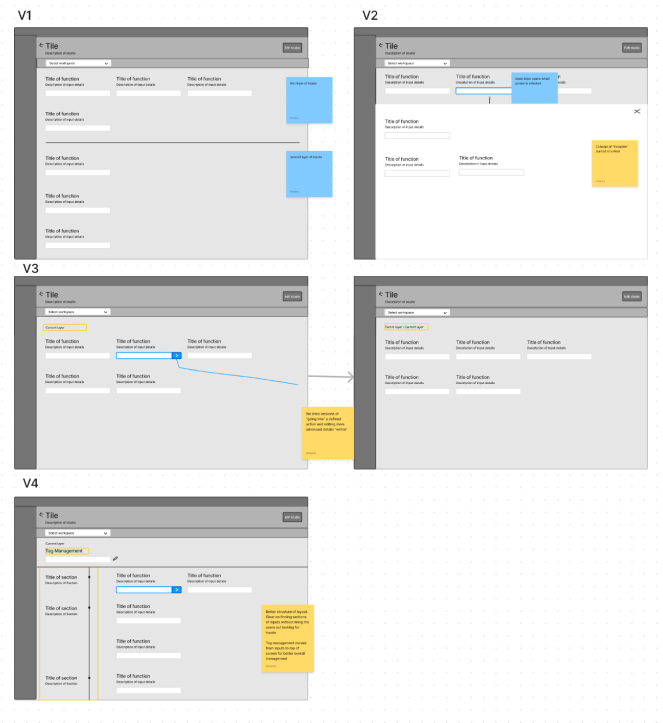
Over the years The layouts changed from organizing inputs in a logical hierarchy all the way to inception type interactions and section based organization.
The layout of how a studio is structured like folders in a computer. Every layer can be it’s own entity while also having the ability to be a parent with multiple levels of children.
2020
First release v1
2022
First release v4
2021
New layout introduction v3
2024
New per studio layouts
Current general workflow
The current workflow for most studios evolves depending on the studio in question. Generally it consists of:
Pick studio
Make edits in various levels
Review issues or success and send to Change Control for proper review
Wireframes are a quick ideation process at Arista.
A lot of times at Arista the designers will work hand in hand with the engineering team or stakeholders over brainstorm sessions. We will get together in the office and go over the feature’s structure in person over quick ideation and sketches either on paper, whiteboard or Figjam. Doing so brings the teams north star into fruition so we’re all on the same page with the structure and direction.

Sometimes, under tight deadlines the basic foundation will be agreed on in these brainstorms and we will have an engineer start coding that structure while the designer finishes the UI mocks.  

Of course having engineering working on a design before it’s done can be messy so having open communication during tight deadlines is a daily to every other day necessity.
Messy but effective team collaboration!
1.5
Hi-fi Mocks

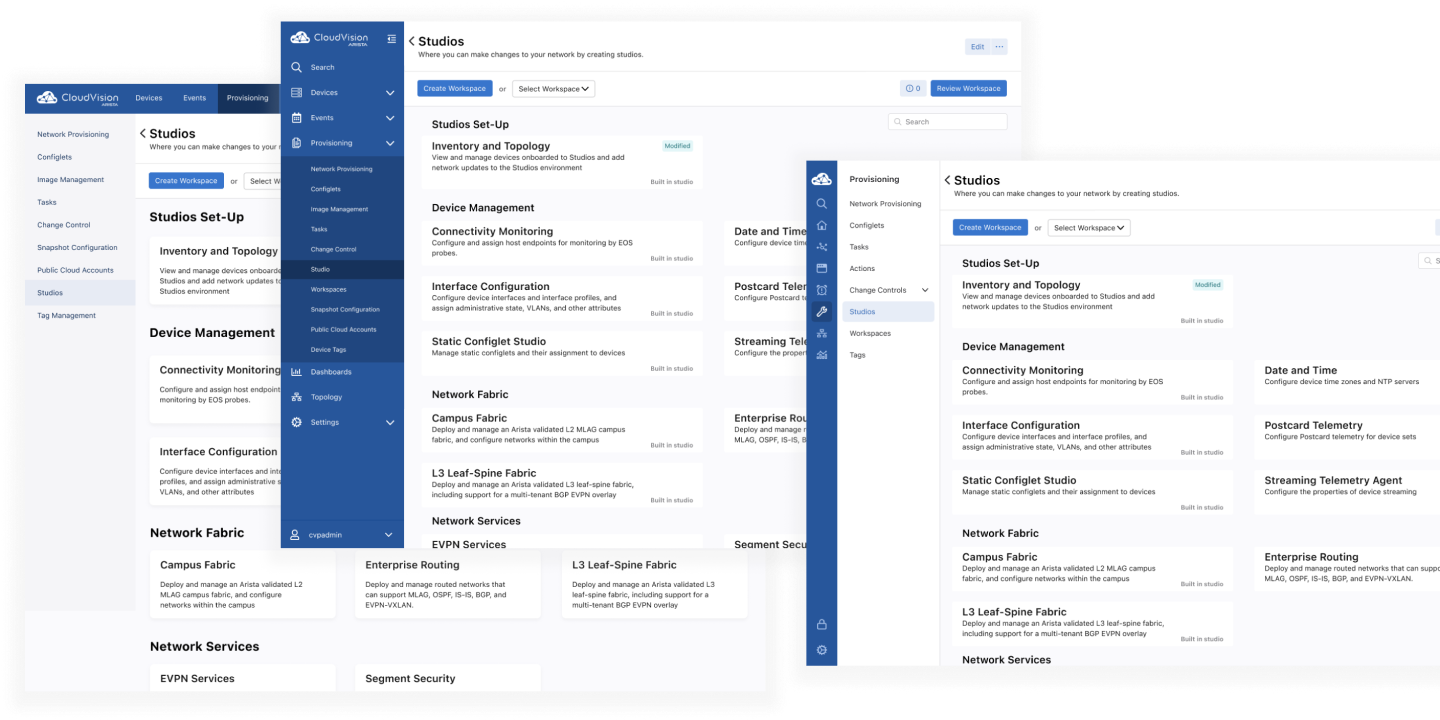
When studios first emerged from the thoughts and ideas of our stakeholders, the CloudVision Design System was yet to be established. During this time we created the foundation of forms and levels of navigation within CloudVision.

The changes and evolution of our design system can be seen through experimentations within Studios.

Homepage Evolution
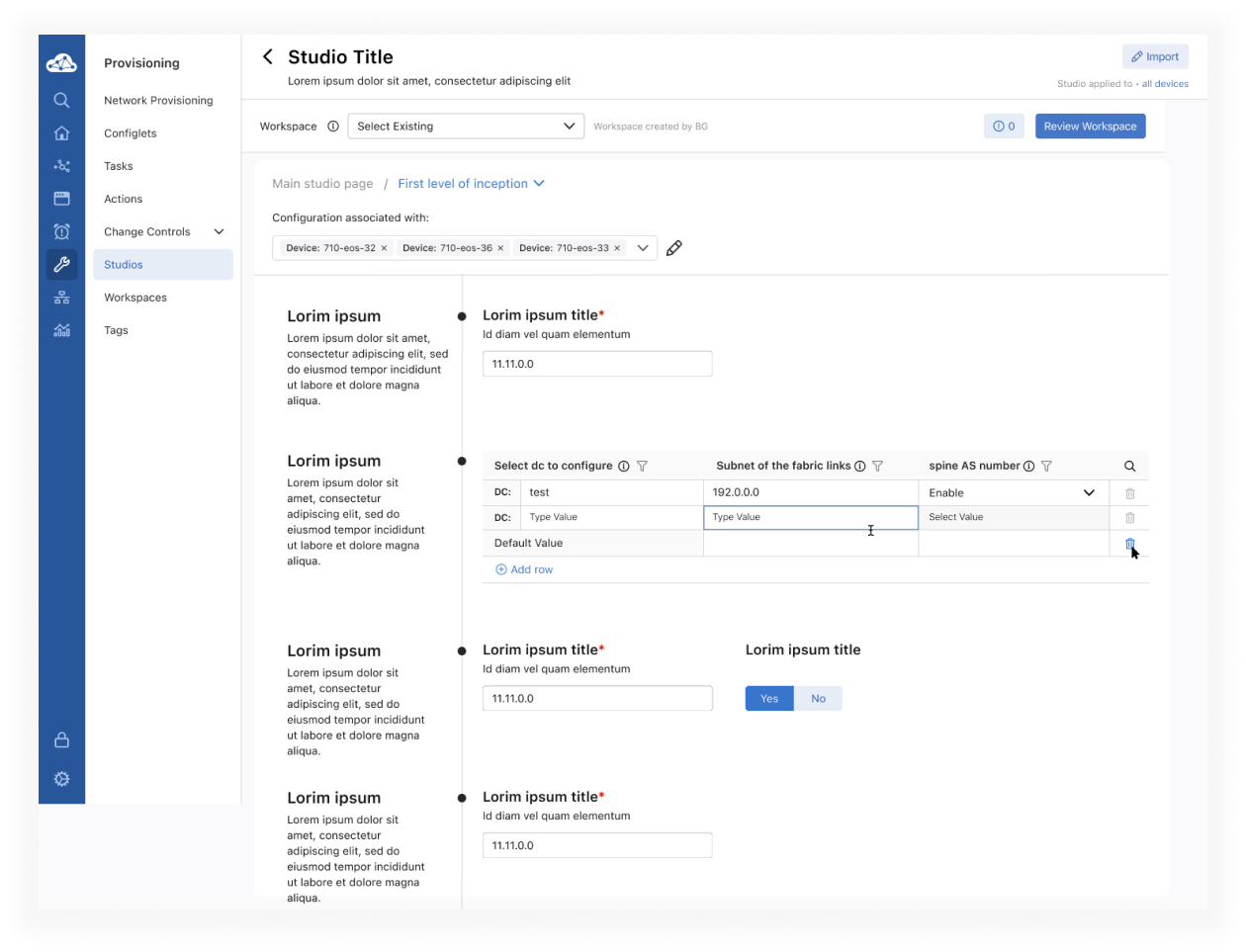
Table components
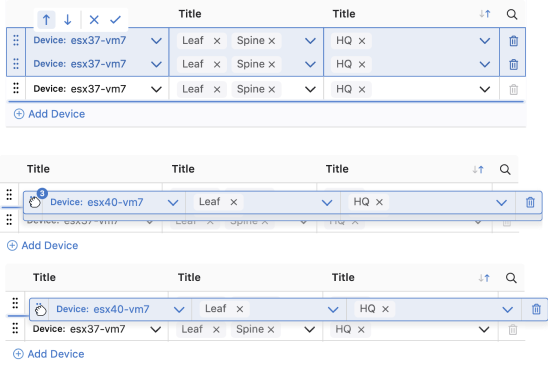
Near the final version of studios layouts we found that the amount of inputs that could be duplicated created a large amount of pain points regarding confusion and a sense of being overwhelmed from our users. Like a spreadsheet I thought it best to create a set of tables that combined a set of
inputs into rows that could be expanded. By doing so set us on a journey of creating an interface that was accessible to those with motor control issues and all the complex logic in defining variables to the right set of inputs and their hierarchies. With many iterations we found a table that worked.
Row rearrangements
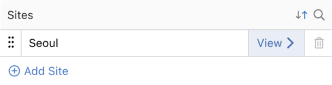
Table variations
Basic table
Table with inception navigation
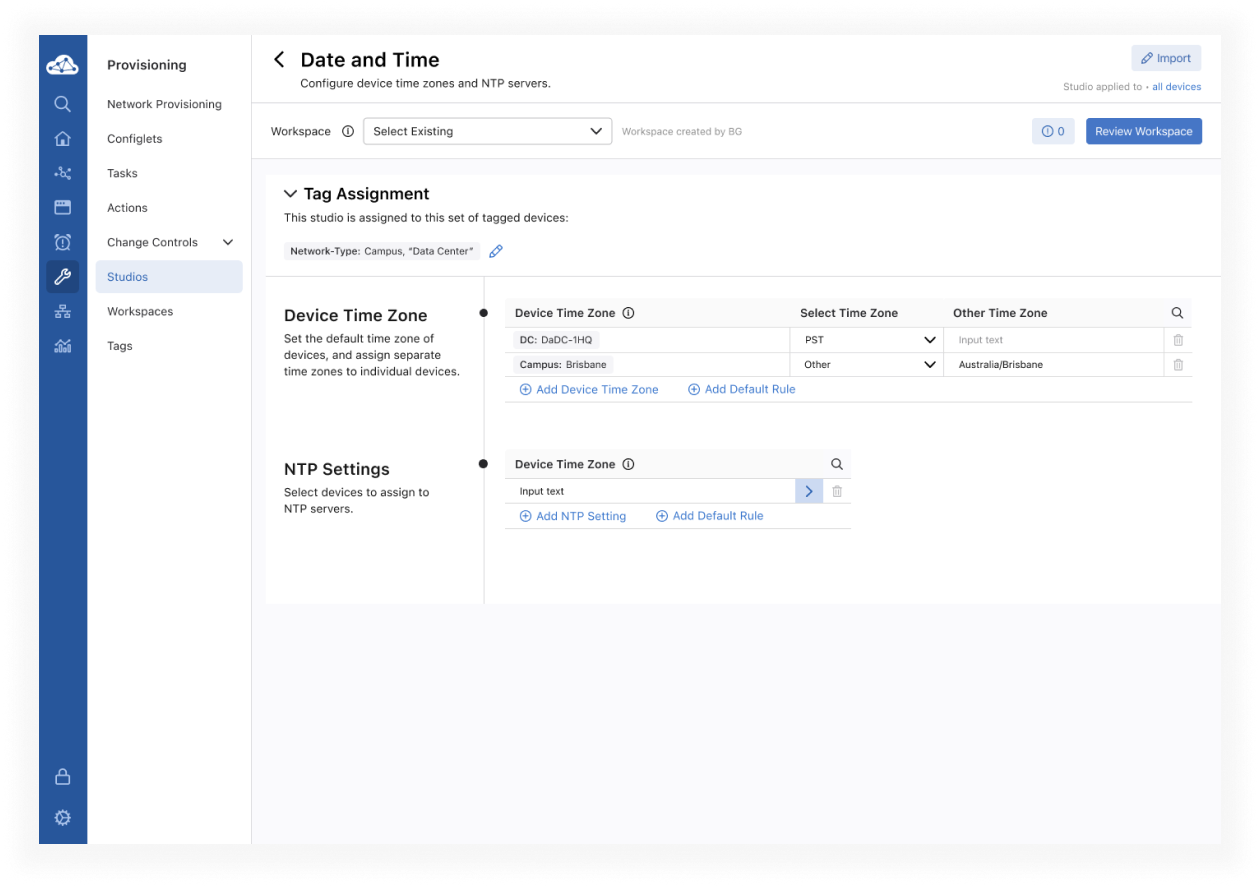
Main Workflow Examples
Due to NDA reasons, there’s a lot of studio content I cannot show but most general studios workflows take on a similar look at feel.
Walkthrough Video

As mentioned earlier, with so few designers on the team when I was working on Studios, there were times when we didn’t have the luxury to create prototypes in Figma. Instead, we collaborated with our engineers to build a version for our SEs to test. You can view a Studios demo here:

1.6
Testing and Results

Studios is an ongoing project even to this day. Constantly evolving and changing to the customer needs. Also with the addition of new hires the team has expanded to cover more features related to studios and it’s expansion. Making Studios designers less spread thin on deadlines and design bandwidth.

Conversations with SE’s
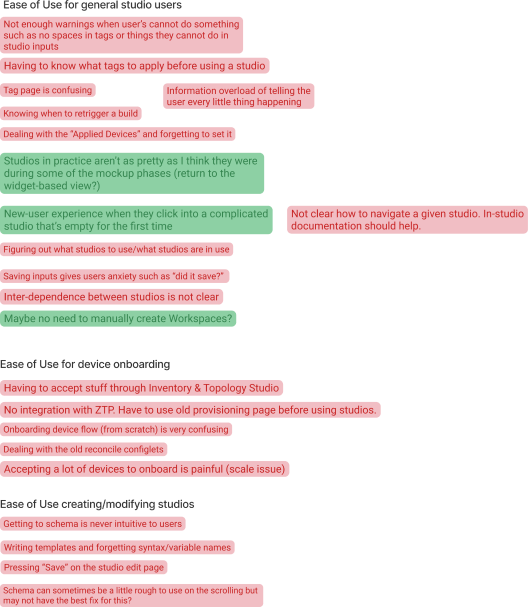
At Arista we like to keep our untested features out of the eye’s of our investors and customers so they don’t think ahead about an interface that may change before release. So we have our Sales Engineers (SE’s) test out built iterations before let our customers try a Beta version of it. SE’s work closely with our customers on a very frequent basis. Answering questions, concerns, moments of confusion and future inquiry’s. They streamline the feedback and discuss pain-points and customer needs/wants with us on a regular basis. We use Figjam for our sessions with SE’s and write any pain- points we hear down as well as highlight in green what goes well or doesn’t have many hiccups on. As well as keeping tabs on final output compared to Hi-Fi mocks.
Take aways and Priority matrix’s
Overall no design is perfect out of the box and that’s the best part. To work together with the team to dissect how things can grow and evolve. From feedback we come together again to map out where, what can be covered, and when. Then we work together with our Product Managers to prioritize.